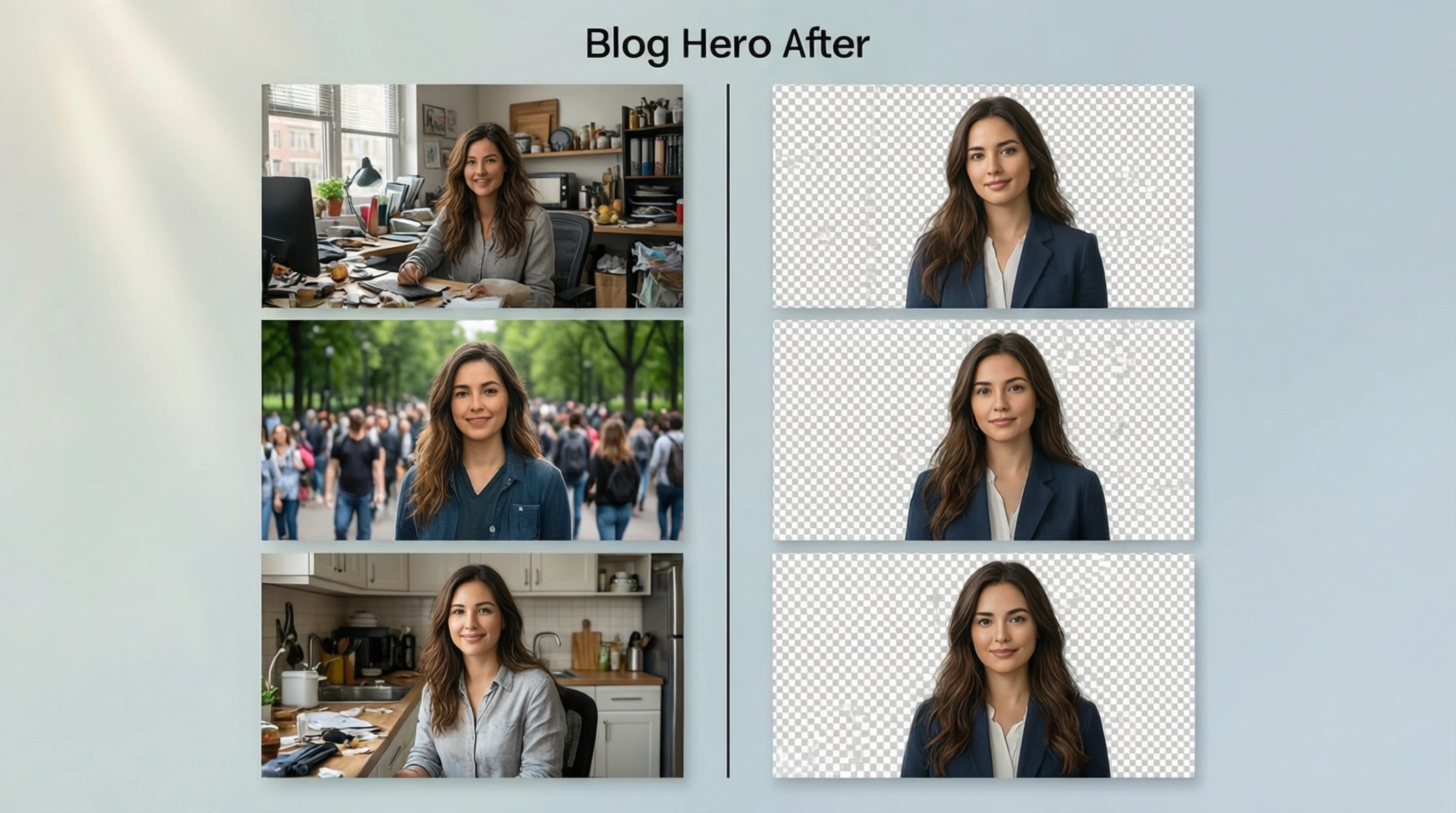
Background Remover: Free Online AI Background Remover Tool
Background Remover: Free Online AI Background Remover Tool
Looking for the best background remover? Whether you searched for "background remover," "baçkground remover," or any variation, you want the same thing: a tool that removes backgrounds from images quickly, accurately, and for free.
This guide compares what makes a great background remover, shows you how to use one, and explains how AI has transformed this once-tedious task into a 5-second process.
What Is a Background Remover?
A background remover is a tool that separates the foreground subject in a photo from its background. The subject — whether a person, product, animal, or object — is preserved with clean edges, while the background is either made transparent or replaced with a new color.
Modern background removers are powered by artificial intelligence. They use deep learning models trained on millions of images to understand what constitutes a "subject" and what constitutes a "background" in any given photo. This makes them accurate, fast, and capable of handling complex images that would take a human editor 15 to 30 minutes to process manually.
How to Use a Free Background Remover
Step 1: Go to the Tool
Open Remove-Backgrounds.net in your web browser. The tool works on desktop, tablet, and mobile.
Step 2: Upload Your Photo
Click the upload area or drag and drop your image. Supported formats include JPG, PNG, and WebP, with files up to 50 MB.
Step 3: AI Removes the Background
The AI processes your image in 2 to 5 seconds. It identifies the subject, creates a precise mask around it, and removes the background.
Step 4: Download the Result
Save your clean cutout as a transparent PNG. No watermarks, no signup, no quality reduction.
What to Look for in a Background Remover
AI-Powered Processing
The best background removers use advanced AI models that handle complex edges, hair, fur, and semi-transparent objects. Avoid tools that rely on simple color-based detection, which fails on most real-world photos.
HD Quality Output
Your output should have the same resolution as your input. A 4000x3000 photo should produce a 4000x3000 cutout. If the output is smaller or blurrier than the original, the tool is downscaling your image.
Clean Edge Detection
Zoom into the edges of the result. You should see:
- Smooth, natural boundaries
- Hair strands and fine details preserved
- No halo or color fringe from the original background
- No jagged or pixelated edges
No Watermarks or Limits
A truly free background remover does not add watermarks to your output, does not reduce the resolution of your download, and does not require you to create an account to access the full-quality result.
Fast Processing
Modern AI can remove backgrounds in 2 to 5 seconds. If a tool takes longer than 10 seconds, it is using older or less optimized technology.
Background Remover: Common Use Cases
Product Photography
Clean product cutouts on white or transparent backgrounds are essential for e-commerce success. A background remover transforms any product photo — whether shot on a kitchen table or in a warehouse — into a marketplace-ready image.
Portrait and Headshot Editing
Replace an unflattering background with a professional, clean backdrop. Perfect for LinkedIn profiles, company websites, ID photos, and personal branding.
Social Media Content
Create visually compelling content by isolating subjects and placing them on designed backgrounds. This technique is used by influencers, brands, and marketers across every platform.
Graphic Design
Background removers are fundamental tools for graphic designers. Transparent cutouts are used in posters, banners, advertisements, websites, merchandise, and virtually every type of visual design.
Presentations
Clean cutouts integrate seamlessly into presentation slides, making your content look polished and professional compared to rectangular photos with mismatched backgrounds.
AI Background Remover vs Manual Editing
| Aspect | AI Background Remover | Manual Editing (Photoshop) |
|---|---|---|
| Time per image | 2-5 seconds | 10-30 minutes |
| Skill required | None | Intermediate to advanced |
| Cost | Free | $22.99/month |
| Edge quality | Excellent | Excellent (skill-dependent) |
| Hair and fur | Handles automatically | Requires specialized technique |
| Consistency | Same quality every time | Varies with skill and attention |
| Batch efficiency | Process dozens quickly | Time-intensive per image |
For the vast majority of background removal tasks, AI tools deliver results that are comparable to or better than what most people can achieve manually, in a fraction of the time.
Tips for Better Background Remover Results
Image Quality
- Use original, high-resolution photos for the sharpest results.
- Avoid heavily compressed images or screenshots.
- Ensure your subject is in sharp focus.
Lighting and Contrast
- Good lighting helps the AI distinguish subject edges.
- Strong contrast between subject and background produces the cleanest separation.
- Avoid shooting subjects against backgrounds of the same color.
Subject Positioning
- Keep the entire subject within the frame with space around edges.
- Avoid subjects that are cropped at the image border.
- Center the subject for the most balanced result.
Format Choice
- Upload the highest quality version available (original file, not a shared/compressed copy).
- Download as PNG to preserve transparency.
- Convert to JPG only for final delivery when transparency is not needed.
Frequently Asked Questions
Which is the best free background remover?
The best free background remover combines AI-powered edge detection, full-resolution processing, no watermarks, and no mandatory signup. Remove-Backgrounds.net meets all of these criteria.
Can a background remover handle complex images?
Yes. Modern AI background removers handle complex subjects including hair, fur, translucent materials, irregular shapes, and multiple subjects in a single image.
Does the background remover work on mobile devices?
Yes. Browser-based background removers work on any device with a web browser — including iPhones, Android phones, iPads, and tablets.
Can I use the background remover for commercial purposes?
Yes. Images processed through Remove-Backgrounds.net can be used for any purpose, including commercial products, marketing materials, and online listings.
What happens to my images after processing?
Images are processed temporarily and are not stored permanently or used for AI training. Your photos remain private.
Try the Best Free Background Remover
Ready to experience the best background remover available? Visit Remove-Backgrounds.net to remove backgrounds from any image instantly.
Free. Fast. No signup. No watermarks. Just professional-quality background removal in seconds.
Upload your first image and see the difference AI makes.