Remove Background HD: Get Crystal-Clear Image Cutouts with AI
Remove Background HD: Get Crystal-Clear Image Cutouts with AI
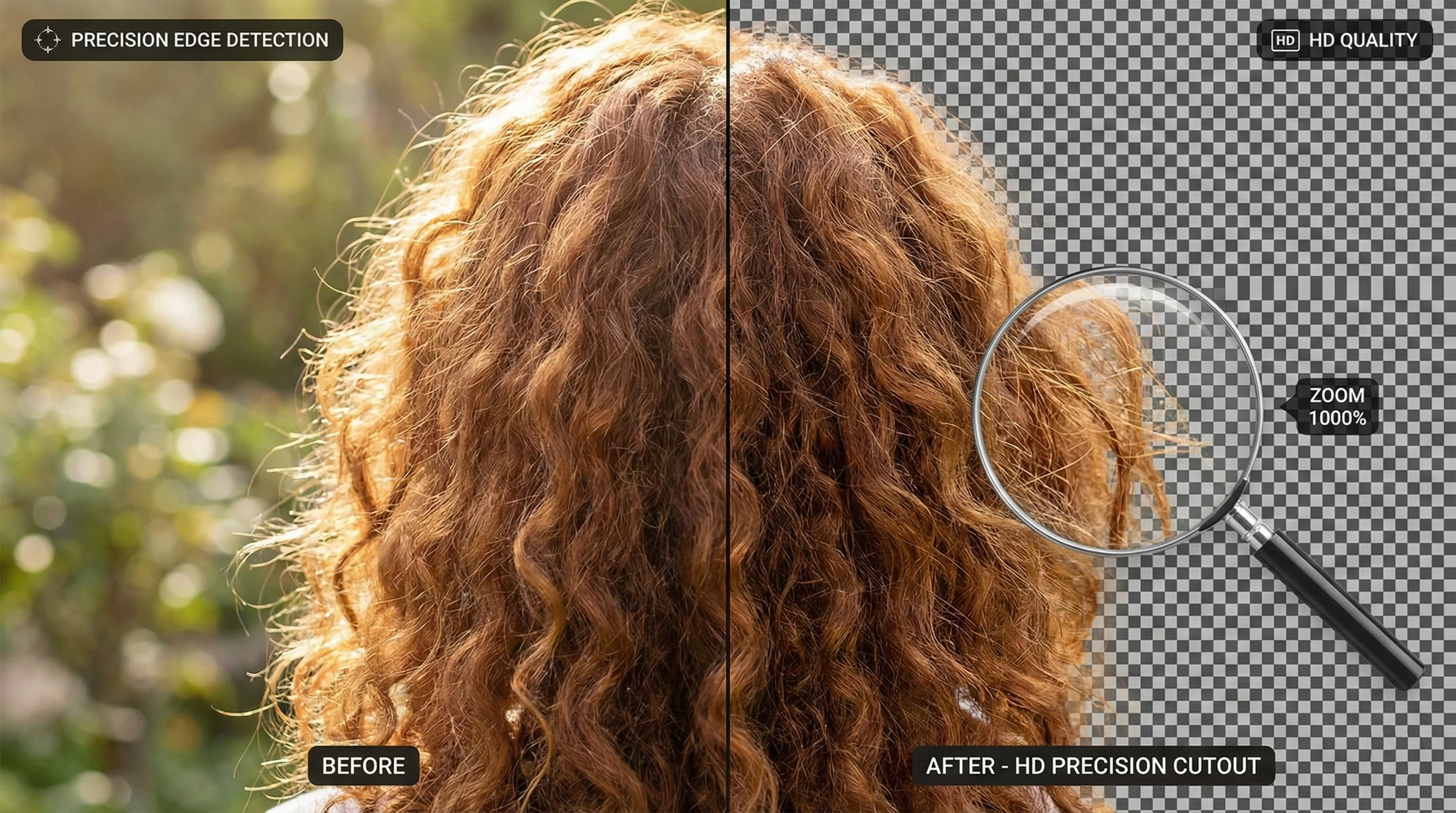
Want to remove background HD from your images while keeping every detail intact? Our AI-powered image background remover delivers crystal-clear results with perfect edge detection, preserved hair details, and sharp masks—all in full HD quality. Whether you're creating professional product photos or stunning portraits, HD background removal ensures your images look flawless.
What is HD Background Removal?
HD background removal means extracting your subject from an image while preserving the full resolution and every fine detail. Unlike standard background removal tools that compress or downscale your images, remove bg hd processing maintains the original quality from input to output.
Here's why HD quality matters:
Resolution Preservation
When you upload a 4000x3000 pixel image, you should get a 4000x3000 pixel result. Many online tools secretly reduce your image resolution to speed up processing, leaving you with blurry, unusable results. True HD background removal processes your image at its native resolution.
Detail Retention
High-resolution images contain subtle details that lower-quality processing destroys:
- Fine textures in clothing and products
- Individual hair strands and flyaways
- Subtle gradients and color transitions
- Sharp edges on geometric objects
Professional Output
HD quality is essential for:
- Print materials (magazines, banners, packaging)
- E-commerce listings with zoom functionality
- Large format displays and signage
- Professional portfolios and presentations
How AI Achieves Perfect Edge Detection
The secret behind professional-quality image background remover tools is advanced AI edge detection. Modern deep learning models analyze your image at the pixel level to create incredibly precise masks.
Semantic Segmentation
AI models use semantic segmentation to understand what's in your image. Rather than simply detecting color differences, the AI recognizes objects, people, and products—then determines exactly where each subject ends and the background begins.
Pixel-Level Precision
Traditional selection tools work with rough approximations. AI edge detection operates at the pixel level, making decisions for each individual pixel about whether it belongs to the foreground or background. This precision is what creates those clean, professional edges.
Anti-Aliasing and Smooth Transitions
Raw pixel masks would look jagged and unnatural. Advanced AI applies intelligent anti-aliasing—smoothing the transition between your subject and the transparent background. The result is edges that look natural whether placed on white, colored, or photographic backgrounds.
Advanced AI Technology
Our tool uses a state-of-the-art deep learning model specifically designed for high-resolution image segmentation. Our AI excels at:
- Complex edge scenarios
- Fine detail preservation
- Consistent quality across image types
- Fast processing without quality sacrifice
Preserving Hair and Fine Details
Hair is the ultimate test for any photo background remove tool. Those wispy strands, flyaways, and semi-transparent edges challenge even professional photo editors. Here's how AI tackles this challenge:
The Hair Challenge
Manual hair selection is notoriously difficult because:
- Individual strands are often semi-transparent
- Hair overlaps in complex ways
- Colors blend with backgrounds
- Fine details are easy to miss or over-select
How AI Handles Hair
AI models trained on millions of images have learned to recognize hair patterns and treat them appropriately. Instead of making binary yes/no decisions, the AI assigns transparency values—keeping solid hair fully opaque while making wispy edges appropriately transparent.
Alpha Matting
Alpha matting is the technical process of determining partial transparency. When a hair strand is 50% background and 50% hair, the AI creates a 50% opacity mask for that pixel. This creates natural-looking edges that blend seamlessly with any new background.
| Aspect | Manual Selection | AI Processing |
|---|---|---|
| Hair strands | Often missed or crudely selected | Individually detected and preserved |
| Semi-transparent edges | Impossible to capture accurately | Alpha matting creates natural transparency |
| Processing time | 30+ minutes for complex hair | 2-3 seconds regardless of complexity |
| Consistency | Depends on editor's skill and patience | Uniform quality every time |
Tips for Best Portrait Results
For optimal hair detail preservation:
- Use well-lit photos with clear separation between hair and background
- Higher resolution images give the AI more data to work with
- Avoid heavily compressed images (low-quality JPEGs)
- Consistent lighting helps AI distinguish hair from background
Sharp Masks Without Halos
A common problem with background removal is the "halo effect"—a visible outline of the old background color remaining around your subject. Here's how to achieve clean, remove background hd results without these artifacts.
What Causes Halos?
Halos appear when:
- Edge detection isn't precise enough
- Anti-aliasing captures background color
- Masks are too aggressive or too conservative
- Color spill from the background affects subject edges
How to Avoid Edge Artifacts
Quality AI models are specifically trained to minimize halos. They accomplish this by:
- Analyzing color at edges to remove spill
- Creating precise masks that follow the actual edge
- Applying appropriate feathering without capturing background
- Understanding the difference between subject color and background reflection
Quality Indicators
A well-processed image shows:
- No visible outline around the subject
- Natural-looking edges at any zoom level
- Smooth transitions between subject and transparency
- Consistent edge quality around the entire subject
HD Resolution Preservation
When you need to remove bg hd, maintaining resolution is crucial. Here's how different approaches handle your image quality:
| Tool Type | Input Resolution | Output Resolution | Quality Loss |
|---|---|---|---|
| Low-quality free tools | 4000x3000 | 800x600 | 95% detail lost |
| Standard tools | 4000x3000 | 2000x1500 | 75% detail lost |
| HD tools (like ours) | 4000x3000 | 4000x3000 | 0% - Full preservation |
Why Many Tools Downscale
Processing high-resolution images requires significant computing power. Many free tools reduce image size to:
- Speed up processing
- Reduce server costs
- Force users to premium tiers for HD
Our Approach: Native Resolution
We process your images at their full native resolution because:
- Your work deserves the quality you started with
- Professional use cases require HD output
- Downscaling destroys irreplaceable detail
- Modern AI can handle HD without compromise
No Compression, No Quality Loss
Beyond resolution, we also preserve image quality:
- No additional JPEG compression
- Clean PNG output with full color depth
- Original sharpness and detail maintained
- Transparency preserved without artifacts
Common HD Background Removal Use Cases
High-quality image background remover tools serve countless professional applications where detail matters:
E-commerce Product Photography
Online marketplaces have strict image requirements:
- Amazon requires pure white backgrounds with no shadows
- Shopify stores need consistent product presentation
- eBay listings perform better with clean, professional photos
- Zoom functionality means customers see every detail
HD quality ensures your products look professional even when customers zoom in for a closer look.
Professional Headshots and Portraits
Corporate photos, LinkedIn profiles, and professional portfolios demand:
- Perfect hair detail preservation
- Natural-looking edges
- High resolution for printing and digital use
- Flexibility to place on different backgrounds
Print-Ready Images
Physical printing requires the highest quality:
- Flyers and brochures need crisp edges at any size
- Banners and posters are viewed up close
- Packaging demands pixel-perfect product images
- Magazine layouts require professional-grade assets
High-Resolution Social Media
While social platforms compress images, starting with HD ensures:
- Maximum quality after platform compression
- Flexibility to crop and reframe
- Future-proofing for higher resolution displays
- Professional appearance that stands out
Step-by-Step HD Background Removal
Ready to photo background remove with HD quality? Here's how simple it is:
Step 1: Upload Your High-Resolution Image
Drag and drop your image onto our tool, or click to browse your files. We support:
- JPEG/JPG (up to 10MB)
- PNG (up to 10MB)
- WebP
For best HD results, use the highest resolution version of your image available.
Step 2: AI Analysis and Mask Creation
Our AI instantly analyzes your image:
- Identifies the subject and background
- Detects edges at pixel-level precision
- Creates a detailed mask with proper alpha channels
- Processes hair and fine details with care
This happens in just 2-3 seconds, regardless of image complexity.
Step 3: Edge Refinement
The AI automatically:
- Refines edges for natural appearance
- Applies anti-aliasing for smooth transitions
- Preserves semi-transparent areas like hair
- Eliminates halos and color spill
Step 4: Preview Your Result
See your image with the background removed, displayed against a transparent checkered pattern. Check:
- Edge quality around your subject
- Hair and fine detail preservation
- Overall cleanliness of the mask
Step 5: Download Full HD PNG
Click download to receive your image as a high-quality PNG:
- Full original resolution preserved
- Clean transparency for any background
- No watermarks or quality reduction
- Instant download to your device
Get Crystal-Clear Results Today
You've seen how to remove background hd with professional-quality results. Our AI-powered tool delivers:
- Perfect edge detection that captures every detail
- Hair and fine detail preservation using advanced alpha matting
- Sharp masks without halos for clean, professional edges
- Full HD resolution with zero quality loss
- Fast 2-3 second processing regardless of complexity
Best of all, it's completely free with no watermarks, no signup required, and no hidden limitations. Whether you're preparing e-commerce photos, professional headshots, or print materials, our HD background remover delivers the quality your work deserves.
Upload your image now and experience the difference HD quality makes.